Update Mobile Numberuser manual

The first step
Login via the National Single Sign-On Portal

Step two
Log in using the association account

Step 3
A temporary confirmation code will be sent to your registered mobile phone, please enter it and then click "Continue"

Step Four
Your account page will appear, here you can click on the option to choose the personal data option
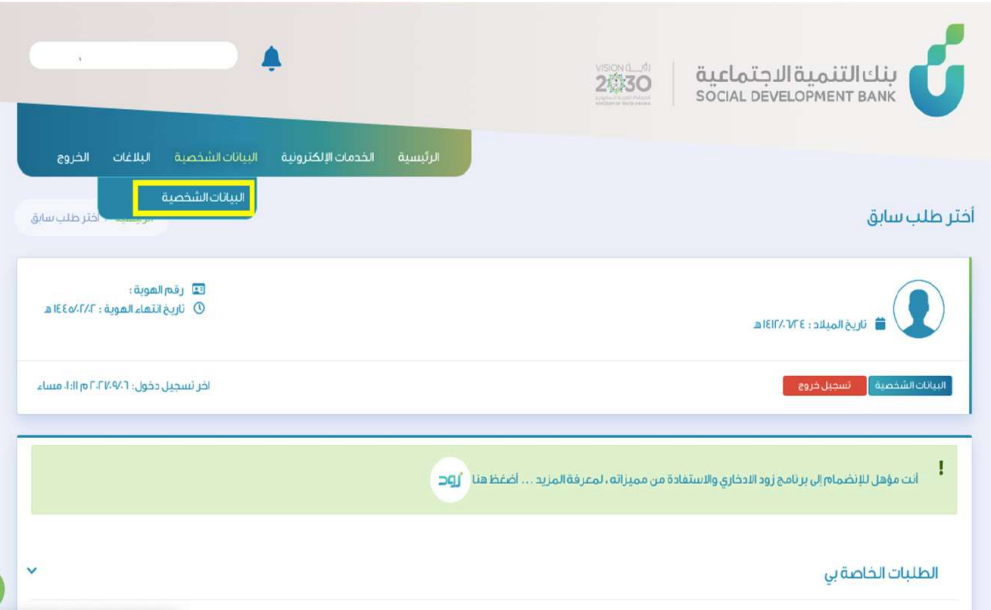
Step Five
Add the mobile number, then confirm the accuracy of the information by clicking on the Verify option.

Step 6
A confirmation code will be sent to your mobile number. Enter the number.

Step Seven
Mobile number has been successfully verified.

Step Eight
In this step, the service is evaluated at the bottom of the page.
